16 Irresistible Black Friday Email Templates You Can Steal Right Away
Read summarized version with
Summary
- What it offers: Sixteen ready-to-use Black Friday email templates you can adapt for your store.
- Why they help: Templates save the time normally spent writing copy, designing, and testing under deadline pressure.
- How to use them: Grab a template and customize it so your Black Friday emails ship faster.
Creating your Black Friday email campaign can be chaotic.
You must write sharp copy, design eye-catching visuals, test links, and get approvals before the clock runs out.
No wonder most teams spend weeks perfecting them.
Because when Black Friday hits, everyone’s fighting for the same few seconds of attention.
To stand out, you need more than just good offers. You need a clear strategy and enough time to fine-tune it.
That’s where these Black Friday email templates help. They give you a head start by handling the structure and design so that you can focus on strategy, timing, and message.
Instead of starting from scratch, you can spend your energy where it matters most: building campaigns.
In this post, you’ll find 16 creative Black Friday templates you can steal right away. They will keep your brand consistent and help you get started with your BFCM email campaign.
But First, Why Bother With Black Friday Templates?
If you create your emails manually, you’re handling copy, layout, product images, color schemes, button placement, and the technicalities.
This means half your day is gone before you’ve even scheduled a single send, especially if you’re a small business.
Templates are your lifesaver. They offer a ready-made structure with a header, product section, call-to-action buttons, and a footer that you can customize to your liking.
This matters even more during Black Friday, when you’re likely sending many emails. Templates keep your campaigns consistent without forcing you to rebuild everything each time.
Your customers experience a cohesive brand, and you avoid the pressure of creating something new with each email.
Plus, good templates are already tested for the basics. They display correctly on mobile, and the call-to-actions are clickable. Moreover, the layout remains consistent across different email clients.
Best Black Friday Email Templates From Smartrmail
Here’s the juicy part: 16 Hand-picked Black Friday email templates for you.
Let’s begin with templates from SmartrMail, an email marketing platform specifically designed for e-commerce businesses.
SmartrMail offers several Black Friday-ready options, each designed for different campaign moments: building anticipation before the sale, announcing your deals, or creating urgency as time runs out.
Most email templates you find online come as PDF or Photoshop files that you then have to wrestle into your email platform. SmartrMail skips that entirely.
When you connect your store to SmartrMail, it generates email templates that match your website’s design. That means your logo, colors, and branding are already in place.
From there, you can add products with a single click, complete with images, descriptions, and prices.
You can then send emails directly to your customers without juggling multiple platforms.
And since you’re building directly in SmartrMail, there’s no wondering whether your template will work. When you connect your store, you get a 15-day free trial with full access to send to your entire list.
We’ve picked out the most effective ones and explained when and how to use each.
Black Friday: “It’s coming!” Template
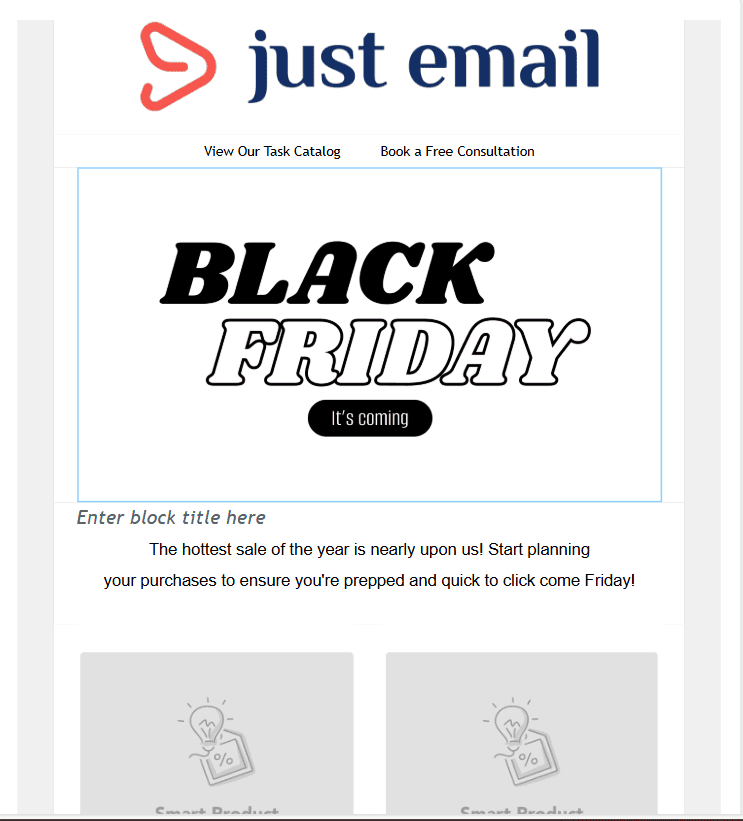
As the name suggests, this is your anticipation-builder template. This is the email you send before your sale goes live. The bold BLACK FRIDAY heading creates excitement for what’s about to happen.
Use this to get people ready so they don’t miss your actual launch.
Why we like it
Teaser emails work because they prime your audience. When people know something good is coming, they’re more likely to watch for your launch email and act quickly when it arrives.
The visual impact is strong enough to cut through inbox clutter, and the two-product slots let you hint at what kinds of deals are coming without giving everything away. It builds curiosity without requiring customers to do anything yet.
How to use it
You can start using this template as early as one to two weeks before your Black Friday sale, depending on your campaign strategy.
Many brands send their first teaser early to build anticipation, then follow up closer to launch (24–48 hours before) to keep the excitement high.
- In SmartrMail, add two products that represent your sale well; maybe your most popular items or something new you’re discounting.
- Change the headline to something like “Tomorrow at 9 am” or “Friday morning, it’s on” so people know when to come back.
- In the subheading, tease your offer. Use something like “Our biggest sale of the year” or “Everything up to 50% off.”
- You can keep the “Shop Now” buttons (they’ll link to your regular store) or change them to “Set a Reminder” or “Mark Your Calendar” if you want to focus on the timing.
To get this template, just sign up for free and connect your store. Doesn’t even take a minute!
Black Friday “Starts now!” Template
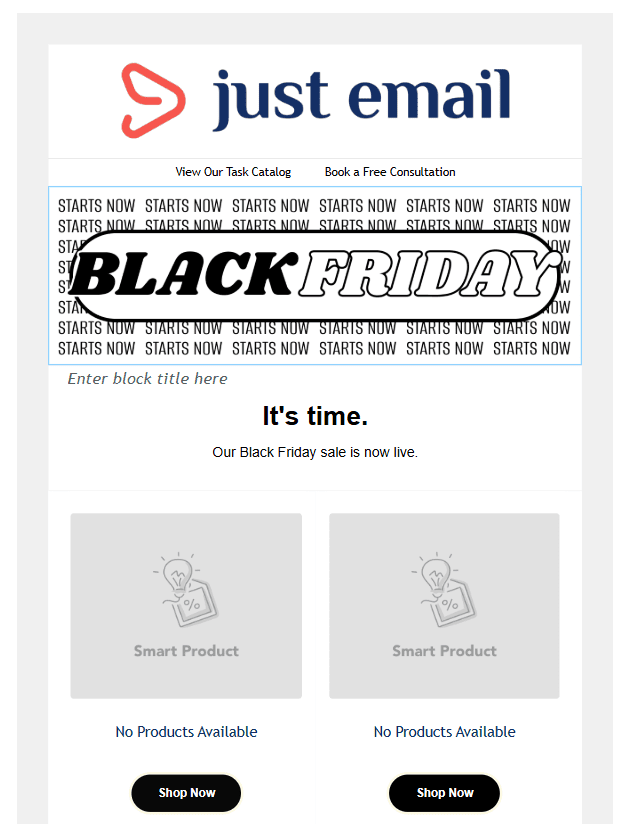
Next up, announcement. This one tells your customers the sale has officially started. The bold BLACK FRIDAY graphic with the repeating STARTS NOW pattern creates immediate urgency, and the clean layout below gives you space to feature your top deals.
The two-in-a-row format keeps things focused without overwhelming people who are already getting dozens of sales emails.
Why we like it
The design does what a launch email should do: it grabs attention and gets straight to the point.
The STARTS NOW repetition isn’t subtle, but that’s the idea, right? You want people to know the moment has arrived.
The side-by-side product layout also works well for highlighting your strongest offers or showing variety in what’s on sale. It’s also mobile-friendly, which is important since many customers will open this on their phones while they’re out or multitasking.
How to use it
Send this the second your Black Friday sale goes live.
- In SmartrMail, swap in your best-selling or highest-discount products using the one-click product picker.
- Keep your headline short. “It’s time” works, or try something like “We’re live” or “Black Friday is here.”
- In the subheading, include your main offer (like “30% off everything” or “Up to 50% off”).
- Ensure that both “Shop Now” buttons link directly to your sale collection or homepage, not individual product pages, so customers can browse all the discounted items.
Just sign up to get this template.
Black Friday – Clean Template
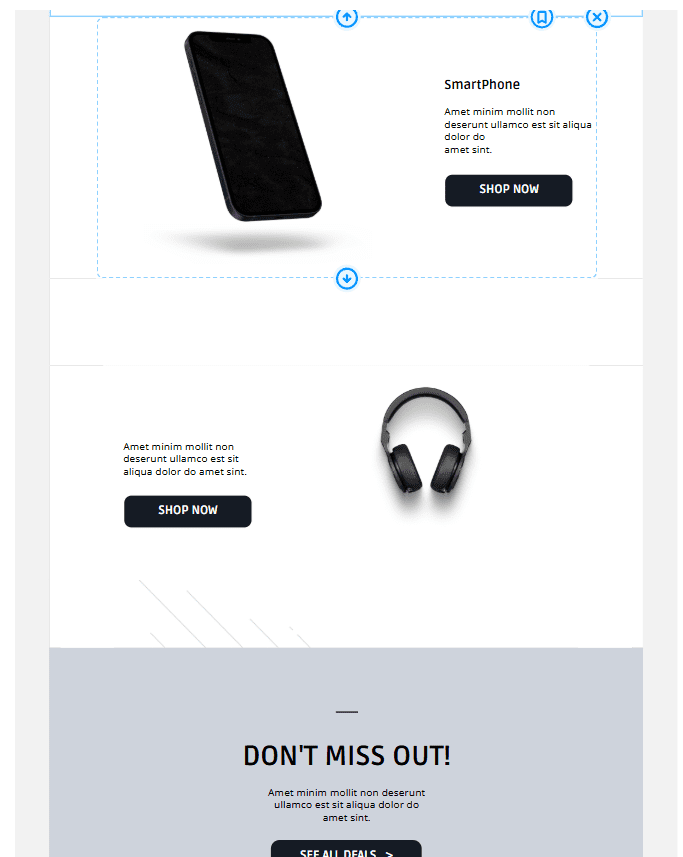
This Smartrmail template is a high-performing one because it adopts a clean, minimalist approach, unlike most other Black Friday emails.
It focuses on the products with plenty of white space, which makes it feel more curated. The two-product layout with alternating image-text positioning creates visual interest without overwhelming your customers.
Why we like it
When every other Black Friday email is screaming with red banners and countdown timers, a clean design can actually stand out more. This template works especially well if you have a premium or sophisticated aesthetic; you’re still running a sale, but you’re not abandoning your visual identity to do it.
The layout gives each product room to breathe and lets customers focus on what you’re selling rather than getting distracted by heavy graphics. It’s also extremely versatile since you can use it throughout your Black Friday campaign without it feeling repetitive.
How to use it
This template works well for mid-campaign emails when you want to showcase specific products without the aggressive urgency of launch or last-chance emails.
- In SmartrMail, add two (or more) products that complement each other or represent different categories.. The alternating layout keeps things interesting if customers are scrolling quickly.
- Customize the product descriptions to highlight what makes each item a good deal, or add your discount percentage there.
Black Friday Last Chance Template
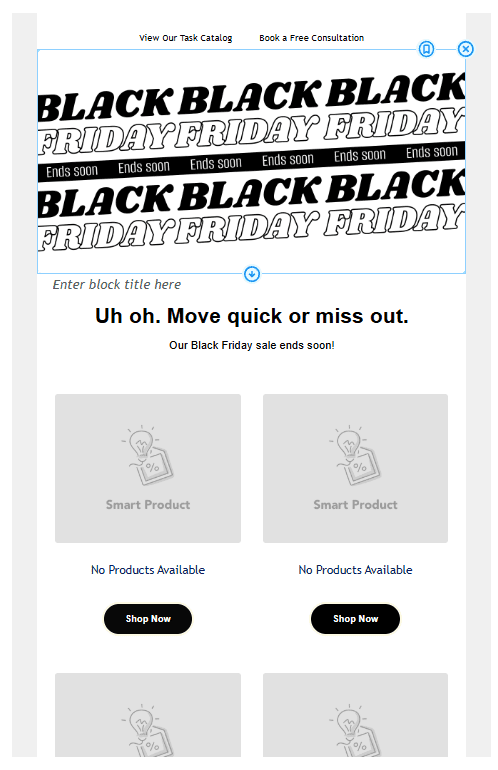
Now, this one is important in your strategy because it tells customers that time is running out and tries to build a sense of urgency.
The four-product grid maximizes your showcase space and gives your customers multiple reasons to click through before it’s too late.
Why we like it
Urgency works, especially when it’s genuine. This template doesn’t hide what it’s doing; it’s designed to make people feel like they need to act now.
The product layout is smart because it gives you more opportunities to convert: even if someone isn’t interested in the first product, they might find something in the other three.
It’s also flexible enough to show category variety or highlight your last remaining inventory across different product types.
How to use it
Send this in the final 6-12 hours of your Black Friday sale.
- In SmartrMail, load the products that either have limited stock remaining or represent your strongest deals.
- The existing headline works well, but you could also try “Final hours” or “Last call for Black Friday.”
- In the subheading, be specific about timing: “Sale ends at midnight” or “Only 6 hours left” so customers know exactly how long they have.
- All four “Shop Now” buttons should work; consider linking them to individual product pages rather than collections, since people clicking this late are usually ready to buy specific items.
This is your final promo, so make sure your messaging is clear and direct.
Cyber Monday – Neon Template
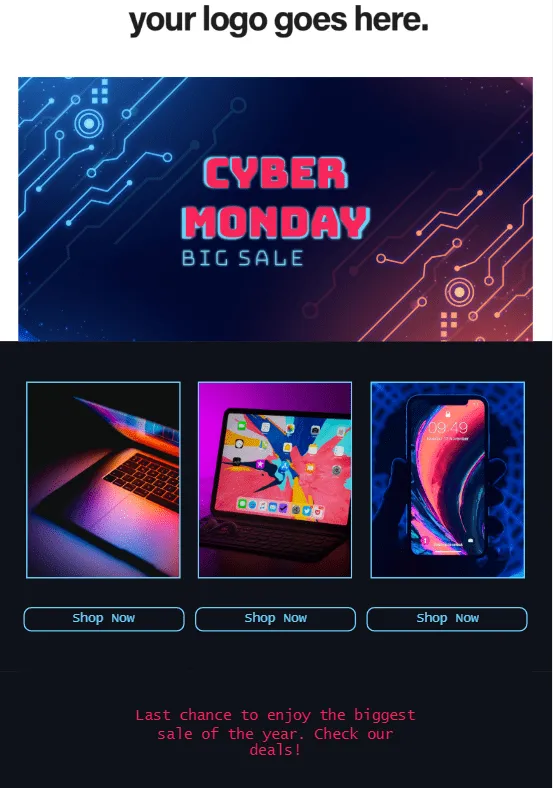
This neon template is designed just for Cyber Monday with a tech-forward aesthetic that fits the digital shopping day perfectly.. The grid layout lets you showcase multiple items at once. This makes it ideal for highlighting your top tech deals or creating a sense of variety in your offerings.
Why we like it
Cyber Monday has its own identity separate from Black Friday, and this template leans into that.
The dark background with neon accents feels distinctly digital and modern, which goes with the flow if you’re selling electronics, gadgets, or any tech-related products. The three-column layout is efficient; customers can scan their options without scrolling much.
This template also creates urgency without being overly aggressive and reminds people that this is their final opportunity for year-end deals.
How to use it
Send this on Cyber Monday morning to capture the influx of online shoppers looking for deals.
- In SmartrMail, add some of your best tech products or your most popular items from any category, be it laptops, tablets, and phones, but you could also even non-tech items if that’s your inventory.
- Keep the product selection focused on items with strong visual appeal since the images are prominent.
- Use the bottom text to reinforce scarcity: ‘Last chance before prices go back up’ or ‘Final hours. Sale ends tonight.’
- Make sure all three ‘Shop Now’ buttons work and link directly to the product pages so customers can buy immediately.
Other Black Friday Templates You Can Try Out
We understand… maybe our awesome templates aren’t the right fit for you. That doesn’t mean that we don’t want to help you.
Below, we have compiled some striking and effective Black Friday email templates from open-access sites that should spark inspiration.
Black Friday Fashion Promo Template
Via Canva
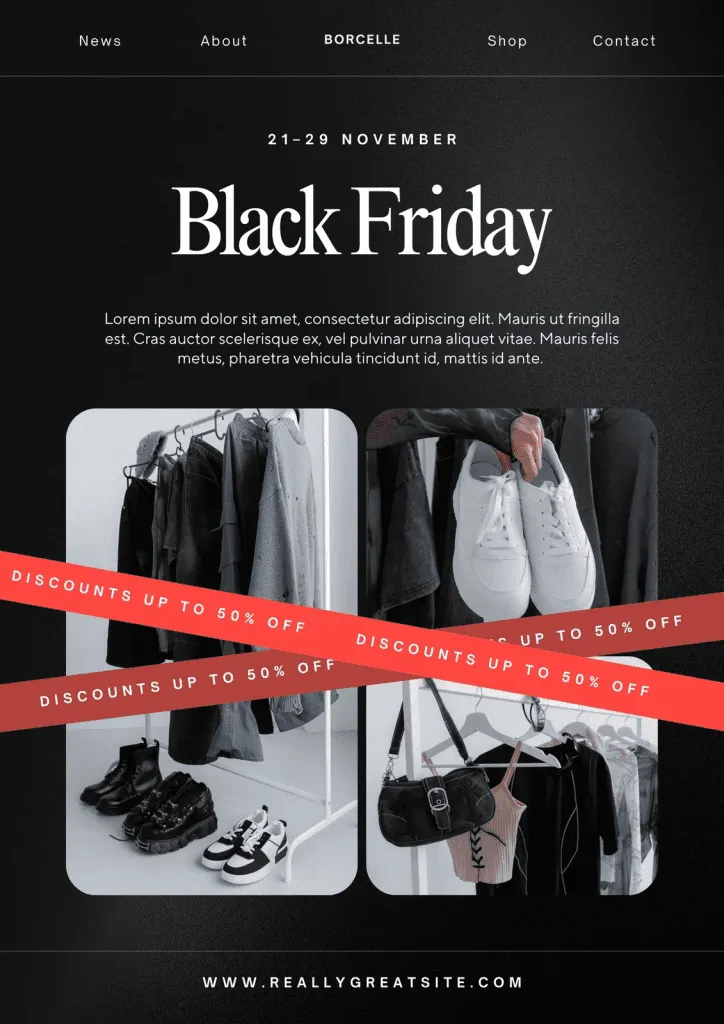
This Canva template gives your Black Friday campaign an editorial look. The two-image layout works perfectly for fashion, apparel, or lifestyle brands, and if you want to show your products in context rather than as isolated items on white backgrounds.
Why we like it
Because it strikes the perfect balance between elegant and promotional, you’re clearly advertising a sale without sacrificing style.
The date range at the top sets clear expectations, and the lifestyle photography makes it feel more like a magazine spread than a discount email. This approach works especially well for brands where aesthetic matters, such as clothing, accessories, home goods, or beauty products.
How to use it
Find this template in Canva and customize the dates, discount percentages, and body text to match your offer. Replace the placeholder images with photos of your own products. Keep in mind that lifestyle shots work better here than plain product photos.
Black Friday Skincare Template
Via Canva
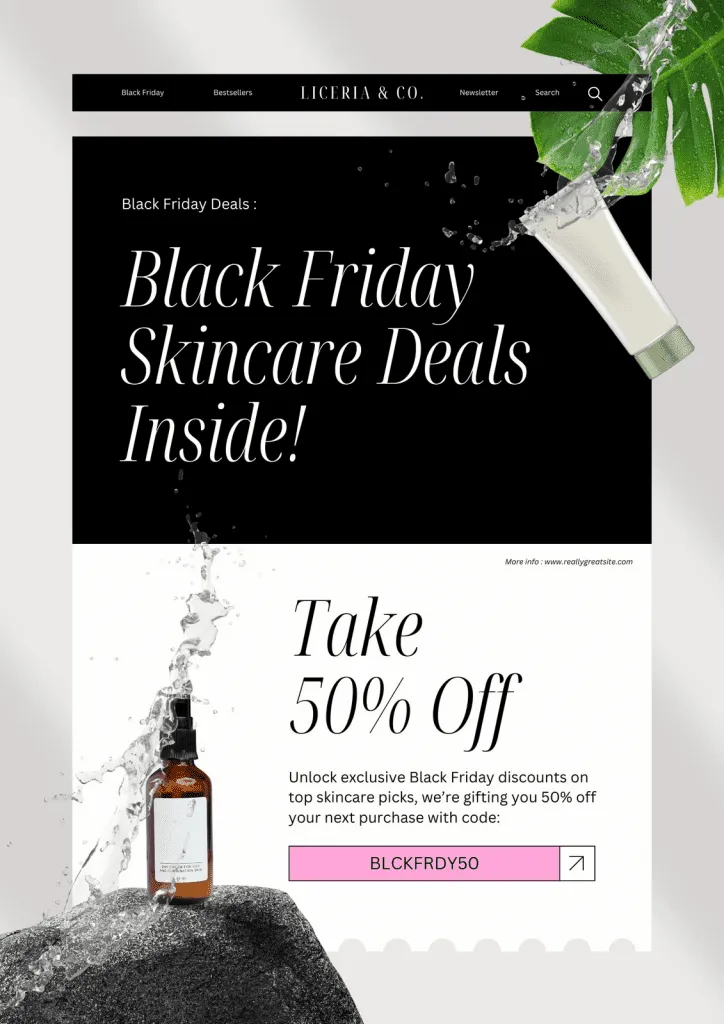
As it’s quite evident, this one works best for beauty, skincare, and medicinal brands with its clean, high-end aesthetic. You’ll need some pleasing product shots for this, though, as much of the template is dependent on your product imagery.
The focus on the discount is the highlight, as it makes it easy for your customers to take action immediately.
Why we like it
Simply because it looks and feels premium, which is just what you want for skincare and beauty products.
We also like how the large, elegant typography tells you about the deal clearly without looking cheap. The coupon code in the highlighted box is smart; it’s visible, easy to copy, and creates a sense of exclusivity.
And notice how the split design guides the eye naturally from the headline down to the offer and call-to-action…that’s neat.
How to use it
Grab this template from Canva and swap in your own product photography, ideally something with clean backgrounds and good lighting that matches the template’s look.
Change the discount percentage and coupon code to match your offer and make sure the pink code box stands out clearly.
Black Friday Tech Store Template
Via Figma
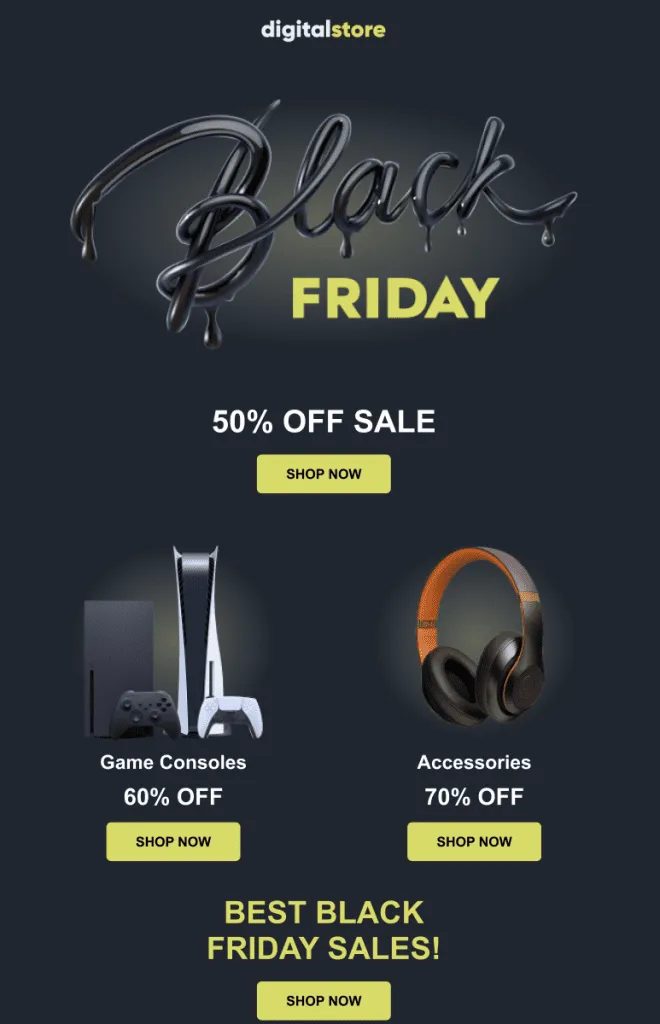
Switching platforms a bit, this Figma template is perfect for electronics and tech retailers with its sleek and modern design. The two-category layout lets you highlight different product lines with specific discounts and make it easy for your customers to navigate to what interests them most.
Why we like it
It’s striking without being cluttered. The 3D typography feels contemporary and catches attention.
Having separate discount percentages for different categories (60% for consoles, 70% for accessories) is smart because it lets you create tiered offers and direct customers to specific inventory.
Moreover, the repeated SHOP NOW buttons give multiple conversion opportunities throughout the email.
How to use it
Download this template from Figma and customize it with your brand name at the top.
Replace the gaming console and headphones images with photos of your products but keep the two-category structure or adjust it to match your inventory. Update all discount percentages to reflect your real offers.
This works great for electronics stores, gaming retailers, or any tech-focused business.
Some Awesome Black Friday Email Examples from 2024 For Inspiration
Still couldn’t find a template that works for you? No problem.
Now, let’s see what big brands did last year and what you can learn from them for this year’s emails.
Google Store Black Friday 2024
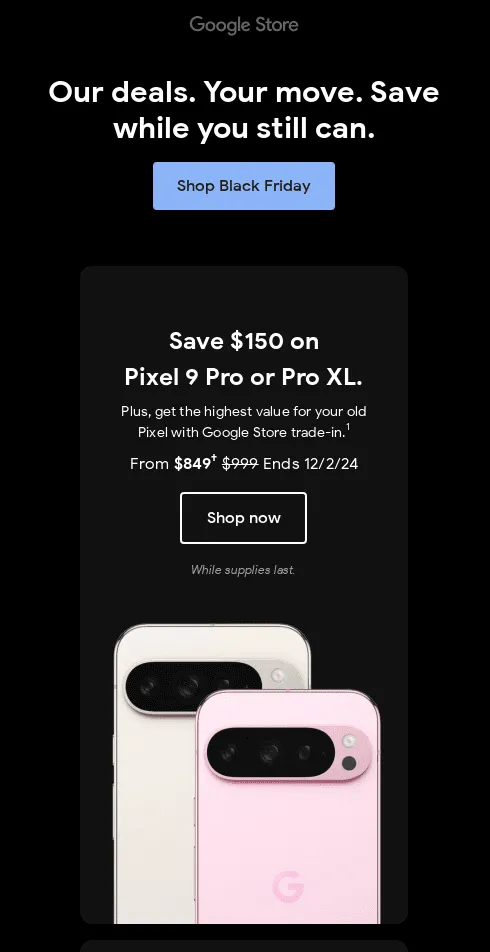
This is a lesson in minimal and benefit-driven design from Google. The black background puts all focus on the message and product, while the headline creates urgency without shouting. Also, notice how the product image at the bottom shows both color options to help customers visualize their choice.
What to learn from this template
- Lead with urgency in plain language. You don’t always have to rely on exclamation marks or all-caps to convey time sensitivity. Sometimes the phrasing does the work.
- Specific dollar amounts beat percentages. Google states “$150 off” and shows the exact price drop ($849 from $999). For premium products, showing the actual savings in dollars feels more substantial.
- Add reassurance with trade-in options and deadlines: The mention of “highest value for your old Pixel with Google Store trade-in” lowers the barrier to purchase, and “While supplies last” creates apparent urgency. These small details address hesitation and scarcity without feeling pushy.
Moment Holiday Sale Email
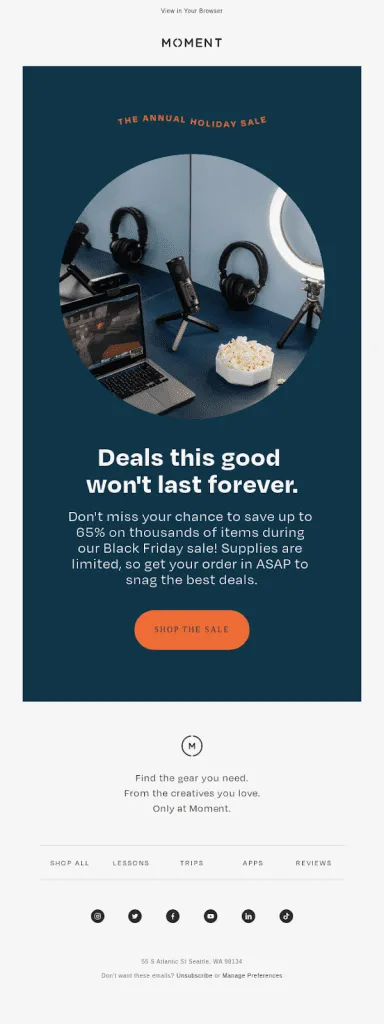
This email from Moment, a brand that sells to content creators and photographers, balances urgency with brand personality.
We like how the headline “Deals this good won’t last forever” is honest and direct without being desperate, and how the body copy clearly states the offer while creating a sense of scarcity.
What to learn from this template
- Show products in context, not isolation. Instead of displaying products on white backgrounds, Moment shows an entire creator workspace. This helps customers visualize how the gear fits into their workflow and subtly encourages purchases.
- Brand consistency matters even during sales: Moment’s use of teal and orange (instead of traditional Black Friday red) maintains their brand identity while still signaling a sale. This works when your brand has a strong visual identity.
Wildwonder Black Friday Email
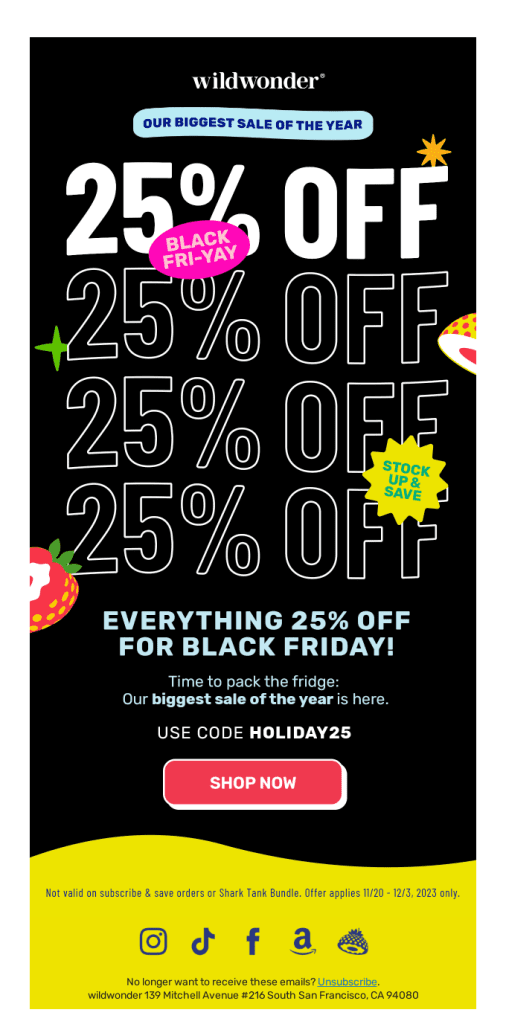
This email from Wildwonder, a prebiotic beverage brand, brings playful energy to Black Friday with bold typography and fun graphics. The copy, as you can see, is casual and inviting, which fits perfectly for a food and beverage brand encouraging bulk purchases.
The email clearly displays both the discount and the specific code to make it easy for customers to act.
What to learn from this
- Repetition creates impact for simple offers: The stacked 25% OFF text is by no means subtle, but it works. When you have a straightforward sitewide discount, repeating it visually hammers the message and fills space without complex product grids.
- Playful graphics can differentiate your brand: The stickers, fruit illustrations, and casual FRI-YAY language give this email personality in a sea of serious, corporate Black Friday messaging. If your brand identity is playful or irreverent, lean into it during Black Friday
Samsung’s Black Friday Promo Email

This email from Samsung is the perfect example of how major tech brands approach Black Friday with a multi-category strategy. The headline maintains a festive tone while the prominent countdown timer creates urgency by showing exactly when the sale ends.
The design uses Samsung’s black, white, and gold color scheme with subtle holiday decorations (stars, gift boxes) that feel elegant rather than overwhelming.
What to learn from this
- Category navigation helps with diverse product lines: Samsung sells everything from phones to appliances, so the top navigation bar lets customers self-segment and jump to what matters to them.
- Hero product strategy focuses attention: Rather than overwhelming customers with dozens of options, Samsung features one standout deal (the OLED TV) prominently. This approach works well for products with high margins or inventory you need to move.
Bonus: Text-Only Black Friday Templates
Graphics are only half the story. What you say and how you say it matter just as much…sometimes more.
Here are four ready-to-use text templates for different moments in your Black Friday campaign.
- The Early Warning
Subject: heads up – black friday starts early this yearHey [First Name],Just a quick note before things get crazy tomorrow.Our Black Friday sale goes live at 9:00 a.m., and based on last year’s sales, some items will sell out by lunchtime. Not trying to stress you out, just didn’t want you to miss it.40% off sitewide (yeah, everything)Free shipping, no minimumSale runs until Sunday at midnightIf there’s something you’ve been eyeing, now’s the time. Set a reminder if you need to. [CTA: link to store]
- The Honest Approach
Subject: Our Black Friday Sale is Live [First Name],I’m not going to pretend this is the biggest sale in human history or that everything will disappear in the next 3 hours.But it IS our best sale of the year, and here’s exactly what you’re getting:CTA: 30% off everything in the store. That’s it. No codes to hunt for, no fine print.If you’ve been thinking about buying something from us, this is the best time to do it. We won’t have another sale like this until next year.The sale runs through Monday. Shop whenever works for you.[CTA: Link to shop]
- The Last Chance Push
Subject: 6 hours leftOur Black Friday sale ends tonight at midnight, and I wanted to give you one last reminder before it’s done.A few things have already sold out (the [popular product] went fast), but most items are still available.If you’ve been on the fence about something, this is your moment. After tonight, everything goes back to regular price, and we won’t have another sale until next Black Friday.Here’s what’s still available: [Link]6 hours. Then it’s over.
- The Visual + Minimal Template
Subject: Black Friday: 50% off[Company Logo][IMAGE: Hero product or Black Friday graphic]50% off everything.Now through Sunday.[SHOP NOW BUTTON][IMAGE: Featured product 1] [Product name – $XX (was $XX)][IMAGE: Featured product 2] [Product name – $XX (was $XX)][IMAGE: Featured product 3] [Product name – $XX (was $XX)]Free shipping on all orders.[SHOP THE SALE BUTTON]Questions? Just reply to this email.
Best Practices Before You Start
Before you start scheduling emails, take a moment to lay the foundation.
These small steps will significantly enhance the effectiveness of your Black Friday campaign.
- Clean your email list first. Remove inactive subscribers who haven’t opened an email in six months. A smaller, more engaged list will yield better deliverability and higher conversion rates than blasting everyone.
- Test your emails on mobile. Approximately 50% of emails are opened on mobile devices. Send yourself test versions and check that buttons are tappable, text is readable without zooming, and images load correctly. If it doesn’t work on mobile, it doesn’t work.
- Plan your sending schedule. Figure out a sequence: a teaser email, a launch announcement, a mid-sale reminder, and a last-chance email. Space them out so you’re not spamming people, but stay visible throughout the weekend.
- Segment when possible. Not everyone on your list needs the same message. Send different emails to past customers versus new subscribers, or highlight different product categories based on previous purchases. Segmentation also helps if you’re A/B testing emails.
- Have a backup plan. Know what you’ll do if something sells out faster than expected, or if your email service has issues.
Get Started With SmartrMail
Phew. That took a while.
The templates in this guide are most effective when you can customize them quickly and send them at the right time.
And that’s where Smartrmail flexes its prowess.
When you connect your online store to SmartrMail, the platform generates email templates that match your website’s branding. That means your logo, colors, and fonts are already in place. You’re not starting from scratch or trying to match hex codes.
From there, you can add products to your emails with a single click, complete with images, descriptions, and current pricing pulled directly from your store.
We also offer a 15-day free trial with no credit card required, which means you can set up your entire Black Friday campaign, customize these templates, and send to your full list without any upfront commitment.
If you’re running an e-commerce store on Shopify, WooCommerce, or BigCommerce, the integration takes minutes.
Connect your store to SmartrMail and start sending Black Friday emails now.
FAQs
- When should I start sending Black Friday emails?
Some brands kick off their Black Friday emails a couple of weeks early, while others wait until the week of the sale to make their move.
Starting around mid-November usually hits the sweet spot. It’s early enough to stand out but not so early that people lose interest. Plus, it gives you time to build some buzz before everyone’s inbox gets flooded.
- How many Black Friday emails are too many?
For most businesses, 3-5 emails over the Black Friday weekend is appropriate. One teaser, one launch, one or two reminders, and one final try is good enough.
Larger retailers with big audiences can send more, but if you’re a small business, focus on quality and timing over volume.
- Should I use the same subject line style for all my Black Friday emails?
No. Vary your subject line approach throughout your campaign. Your first email might be straightforward, your reminder could be curiosity-driven, and your last-chance email should create a sense of urgency. Using different styles helps each email feel fresh and prevents fatigue.
Check out this post for more Black Friday Subject Line Inspiration.
- What if I don’t want to offer big discounts?
You don’t have to compete solely on price. Consider offering bundles, free shipping, gifts with purchase, early access to new products, or exclusive items only available during Black Friday.
Some premium brands successfully run Black Friday campaigns that focus on value-adds rather than percentage discounts.
Launch your next campaign in a flash
15 days free. Then free forever up to 200 active subscribers. Cancel anytime, no questions asked.
You might also like
Unlock the secrets to thriving in the e-commerce world with expert insights, growth tactics, designs, templates, and much more to drive sales for your online store.